Payment flow
The Hero API is concepted to be simple, efficient and secure.
Définitions
Before reading the explanations of our payment flow it's important to have some definitions in mind:
Customer: your clientsPayment Type: the way customers will pay hero. For our Processing Solution, it can only be in 1 installment, instantly.
Explanations
Here is a scheme of our payment flow :
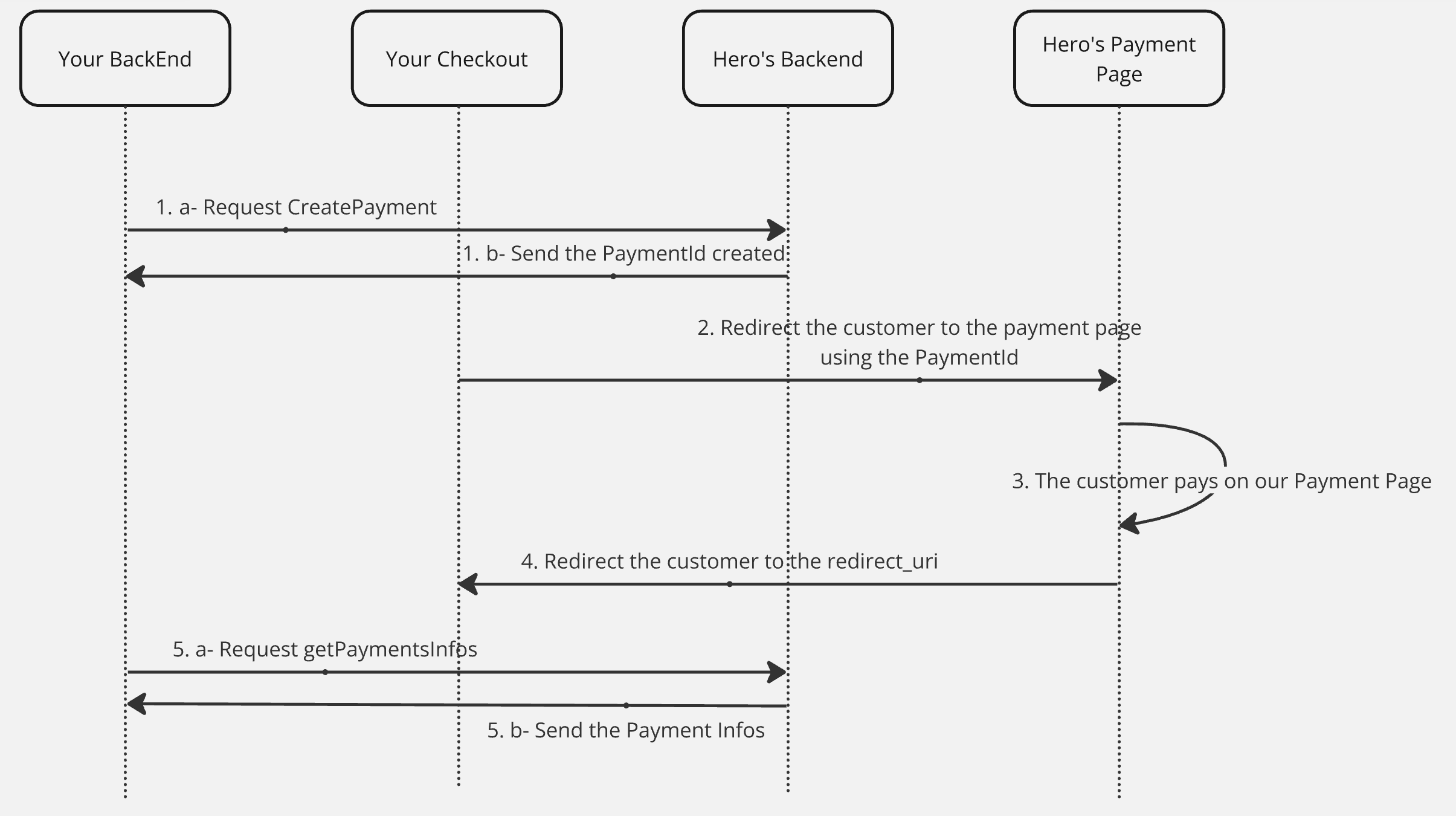
Step 1-a: CreatePayment Request
When the customer chooses to pay with Hero on your Checkout, your back-end should request to createPayment.
At this step you should give some information like a redirection URI. The customer will be redirected to this URI when his payment is confirmed.
For security reasons we check the value of the redirect URI. For instance, a request including URI ending with .localhost will be blocked. Use a non-suspect Redirect URI 😇
Step 1-b: Give back the Payment ID
Hero will give you the payment id (start with payment_id), please save it, you will need it.
Step 2: Redirect to payment page using Payment ID
Now you have the Payment ID, you can redirect customer on this uri:
- Production:
https://pay.heropay.eu/checkout/{payment_id} - Staging:
https://staging.pay.heropay.eu/checkout/{payment_id}
Your customer is now paying via Hero!
If you want to test our payment flow on staging, use the following card informations :
card number : 4010061700000021
expiration : 12/26
CVV : 123
Step 3: Payment
Your customer pays on our payment page. His card information are securely processed.
Step 4: Redirection
Your customer finalized the payment, he is redirected to your Redirect Uri in order to validate his order on your website.
Step 5-a : Call the getPaymentsInfos
You can check the payment's information to know whether a payment has been initiated or not, and to know whether some amount has been or is in the process of being refunded.
Call getPaymentsInfos endpoint with the matching payment_id and then:
Step 5-b : Check the Payments' informations
Our back-end give you the relevant informations for this payment :
- If the payment is initiated, it means that the customer paid
- If there is an error, inform the customer that the payment cannot be finalized and contact our support at support@hero.fr for more information . The payment hasn't been finalized and the customer should try to pay again.